Handwritten Notes ko Computer Text me Kaise Badle? (2026 Easy Guide)
Aaj ke digital zamane me handwritten notes ko computer text me convert karna ek powerful productivity hack ban chuka hai. Chahe aap student ho, blogger ho, ya office professional — agar aap handwritten notes to text conversion seekh lete ho, to aap apna kaafi time aur effort bachaa sakte ho.
Is detailed guide me hum step-by-step samjhenge ki handwritten notes ko digital text me kaise badle, kaunse tools best hain, aur kaise aap maximum accuracy hasil kar sakte ho.
🔍 Handwritten Notes to Text Conversion kya hota hai?
Handwritten notes ko text me convert karne ki process ko OCR (Optical Character Recognition) kehte hain. Ye technology kisi bhi image ya handwritten content ko scan karke usse editable text me convert karti hai.
Simple process:
📸 Image lo → 🤖 OCR scan kare → 📝 Editable text mil jata hai
🧠 Best Free Methods to Convert Handwritten Notes to Text
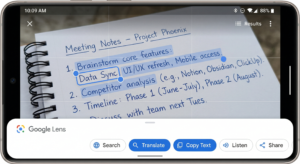
1. Google Lens se Handwritten Notes ko Text me Convert kare
Agar aap beginner ho, to Google Lens se handwritten notes ko text me convert karna sabse easy aur fast method hai.
Steps:
- Apne handwritten notes ki clear photo lo
- Google Lens open karo
- “Text” option select karo
- “Copy Text” par click karo
Ye method quick handwritten notes to text conversion ke liye best hai, especially jab aapko turant text chahiye.
2. Google Docs OCR Feature ka Use kare
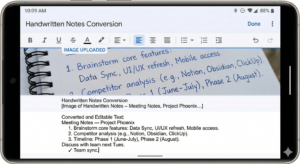
Google Docs OCR tool ek powerful aur free solution hai jo handwritten text ko digital format me convert karta hai.
Steps:
- Image ko Google Docs me upload karo
- Right-click karke “Open with Google Docs” select karo
- Automatically text extract ho jayega
Ye method un logon ke liye best hai jo image to text converter online use karna chahte hain bina kisi app ke.
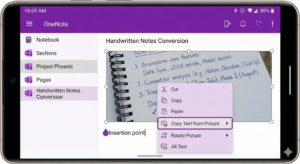
3. Microsoft OneNote OCR Tool
Microsoft OneNote OCR ek underrated lekin effective tool hai jo handwritten notes conversion ke liye kaafi useful hai.
Steps:
- OneNote me image insert karo
- Right-click karo aur “Copy Text from Picture” select karo
- Text ko kahin bhi paste karo
Ye tool handwriting recognition ke liye kaafi reliable hai aur multiple languages support karta hai.
4. AI OCR Apps (Mobile Users ke liye Best)
Aaj ke time me AI-powered OCR apps handwritten notes ko high accuracy ke saath convert karte hain.
Popular apps:
- Adobe Scan
- Microsoft Lens
- Text Scanner OCR
Ye apps specially design kiye gaye hain handwritten notes to digital text conversion ke liye aur daily use me kaafi helpful hote hain.
5. Online OCR Tools (PC Users ke liye)
Agar aap laptop ya desktop use karte ho, to aap online OCR tools ka use kar sakte ho.
Popular tools:
- i2OCR
- OnlineOCR
- Smallpdf OCR
Steps:
- Website open karo
- Image upload karo
- Language select karo
- Convert karke text download karo
Ye tools image to text converter online free category me aate hain aur simple tasks ke liye kaafi useful hain.
⚡ Pro Tips for Better Accuracy
Agar aap chahte ho ki handwritten notes ko computer text me convert karte waqt errors kam aaye, to ye tips follow karo:
✔️ High-quality aur clear image use karo
✔️ Clean background rakho
✔️ Handwriting readable rakho
✔️ Black ya dark ink ka use karo
✔️ Image seedhi (straight) honi chahiye
Ye sab factors OCR accuracy improve karte hain aur better results dete hain.
❌ Common Mistakes Jo Avoid Karni Chahiye
Bahut log handwritten notes convert karte waqt kuch common mistakes kar dete hain:
- Blurry ya low-quality image upload karna
- Tilted ya tedhi photo lena
- Mixed language me unclear writing
- Converted text ko proofread na karna
In mistakes ki wajah se text conversion accuracy kaafi kam ho jati hai.
🧾 Handwritten Notes ko Digital Text me Convert karne ke Fayde
Handwritten notes ko digital format me convert karne ke kaafi benefits hain:
- Students ke liye revision easy ho jata hai
- Bloggers fast content create kar sakte hain
- Office professionals meeting notes easily share kar sakte hain
- Old handwritten diaries ko digital archive me save kiya ja sakta hai
Ye process aapki productivity ko significantly improve karta hai.
🔚 Final Verdict
Agar aap best method choose karna chahte ho, to:
👉 Beginner ke liye: Google Lens
👉 Intermediate users ke liye: Google Docs OCR
👉 Advanced users ke liye: AI OCR apps
Aaj ke time me AI handwriting recognition technology kaafi advanced ho chuki hai aur future me ye aur bhi accurate hone wali hai.
📌 FAQs
Q1. Kya handwritten Hindi notes bhi convert ho sakte hain?
Haan, lekin English ke comparison me accuracy thodi kam ho sakti hai.
Q2. Best free tool kaunsa hai handwritten notes ko text me convert karne ke liye?
Google Lens aur Google Docs OCR sabse reliable free options hain.
Q3. Kya bina internet ke handwritten notes convert ho sakte hain?
Kuch apps offline mode support karte hain, lekin online tools me better accuracy milti hai.